
Xournal++
betaWrite by hand on your PDFs, highlight and take notes.
- Full program
- Ages 8+
- Office and school
- Parent mode: allowed
- Works offline
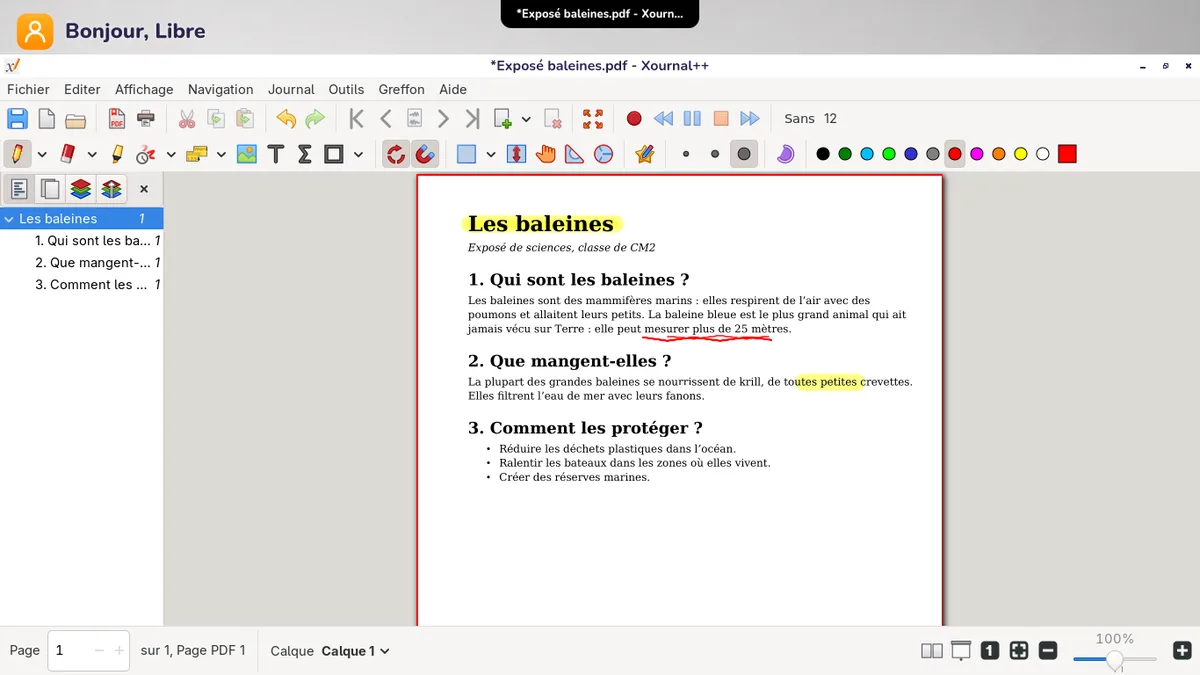
What you can do
- Open a worksheet PDF and write your answers on it.
- Highlight, underline and circle, in colour.
- Take handwritten notes on blank, lined or squared pages.
- Sign a document.
- Export to PDF to hand it in or send it.
Who it is for
From about age 8 (a guide, not a rule). Nicest with a touch screen or a graphics tablet; with a mouse the handwriting is less neat.
What it needs
- Memory1 GB of memory (RAM) to be comfortable; with less, it works but slowly.
- Disk space≈ 15 MB on the disk, once installed.
- ProcessorAny that runs Yapuka.
- InternetNo: it works without Internet.
Parent mode
This extension is allowed even when safe mode is on.
How to install it
Open “Extensions” (System group of the dock), find “Xournal++” and press Install. One tap. Once installed, it works without Internet.
Good to know
- In French, works without Internet, no account.
- The original PDF is not changed: your notes are saved next to it (.xopp) until you export.
- Small extension: about 15 MB.
- Size: ≈ 15 MB.