
PDF Arranger
betaMerge, sort and rotate the pages of your PDFs.
- Full program
- Ages 10+
- Office and school
- Parent mode: allowed
- Works offline
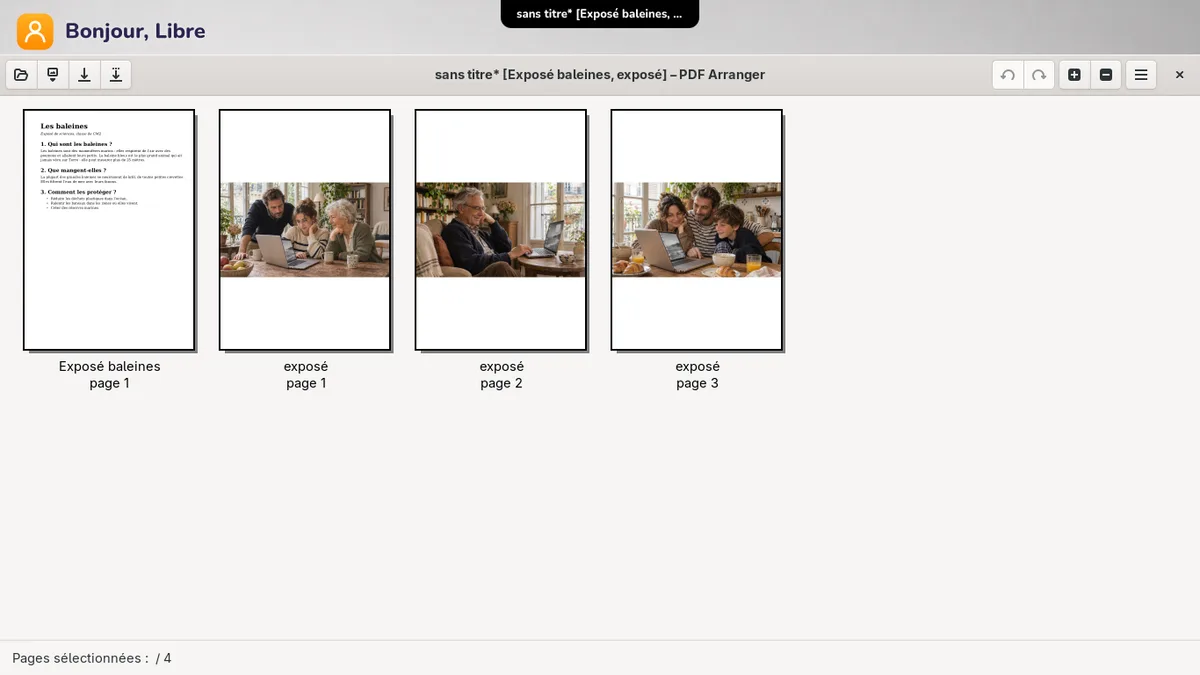
What you can do
- See every page of a PDF as thumbnails.
- Put pages back in order by dragging them.
- Delete or rotate a page.
- Merge several PDFs into one, for example homework scanned page by page.
Who it is for
From about age 10 (a guide, not a rule), and for parents tidying up scanned papers.
What it needs
- Memory1 GB of memory (RAM) to be comfortable; with less, it works but slowly.
- Disk space≈ 80 MB on the disk, once installed.
- ProcessorAny that runs Yapuka.
- InternetNo: it works without Internet.
Parent mode
This extension is allowed even when safe mode is on.
How to install it
Open “Extensions” (System group of the dock), find “PDF Arranger” and press Install. One tap. Once installed, it works without Internet.
Good to know
- It does not change the text on the pages: to write on a PDF, use Xournal++.
- In French, works without Internet, no account.
- PDFs scanned with Yapuka’s “Printers” open directly.
- Size: ≈ 80 MB.