
My music
betaCompose rhythms and melodies by lighting up cells, with your voice as a bonus.
- Yapuka app
- Ages 5+
- Create
- Parent mode: allowed
- Works offline
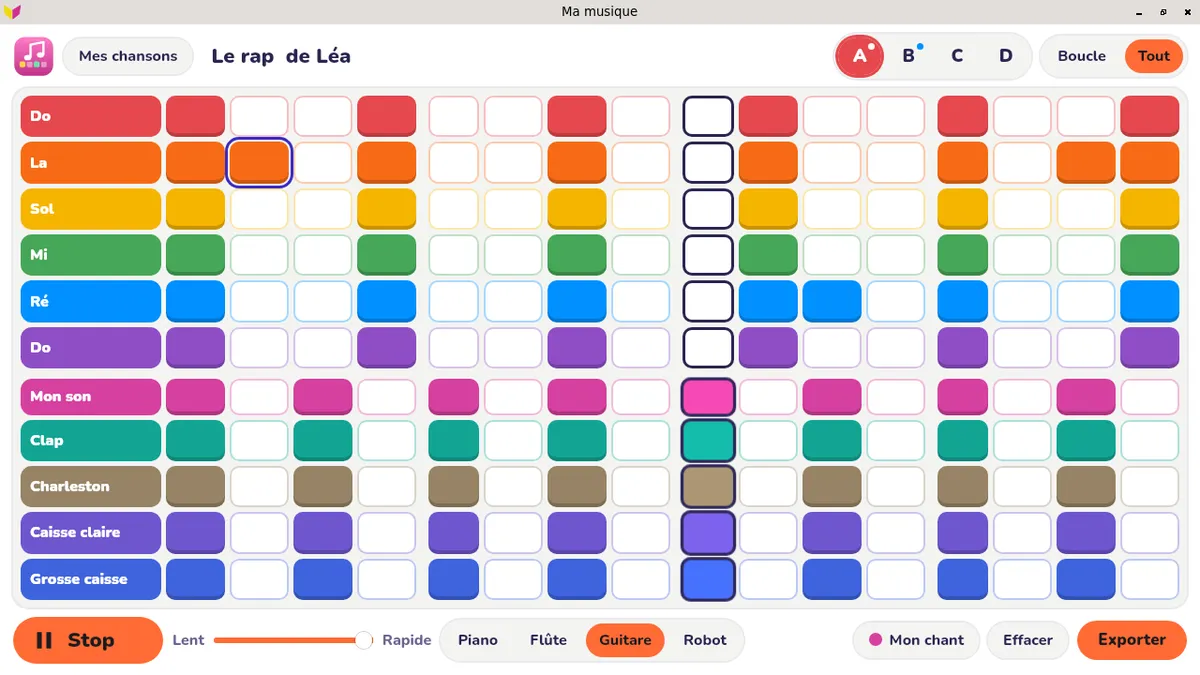
What you can do
- Light up cells on a grid to make music that loops.
- Pick an instrument: piano, flute, guitar or robot.
- Set the speed and chain up to four tunes.
- Record your voice or a noise with the microphone to make “My sound”.
- Export your songs as sound (WAV) or sheet music (MIDI).
Who it is for
From about age 5 (a guide, not a rule): you press cells, the notes always sound good together, no need to read music.
What it needs
- Memory1.5 GB of memory (RAM) to be comfortable; with less, it works but slowly.
- Disk space≈ 100 KB on the disk, once installed.
- ProcessorAny that runs Yapuka.
- InternetNo: it works without Internet.
Parent mode
This extension is allowed even when safe mode is on.
How to install it
Open “Extensions” (System group of the dock), find “My music” and press Install. One tap. Once installed, it works without Internet.
Good to know
- Everything works without Internet.
- No account.
- Your songs are kept in Documents › My music; “Export” puts them in the Music folder.
- For now it can’t use a USB MIDI keyboard: you compose with the cells.
- Size: ≈ 100 KB.