
Cartable (school bag)
betaYour homework in one place: what is for tomorrow, what is late, and your Pronote if you want.
- Yapuka app
- Ages 8+
- Office and school
- Parent mode: allowed
- Works offline
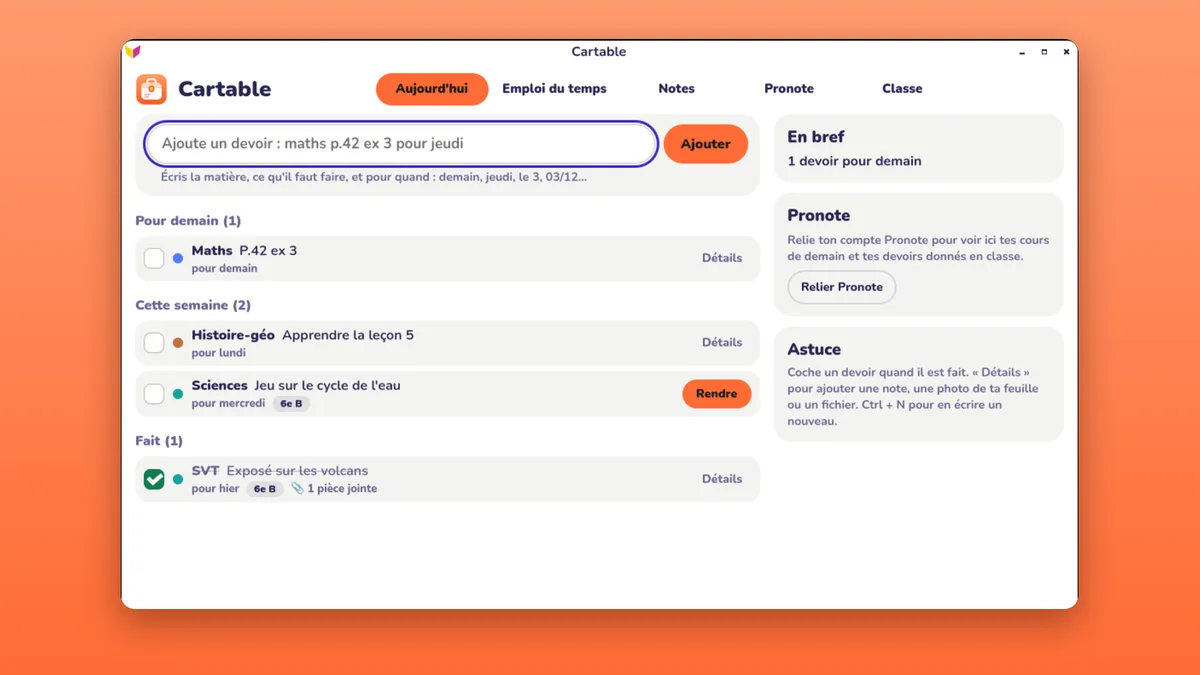
What you can do
- Write a piece of homework in one line, the way you talk: “maths p.42 ex 3 pour jeudi”. Cartable works out the subject and the date.
- See at once what is late, for tomorrow, this week and later.
- Tick homework off when it is done, and add a note, a file or a photo of your sheet.
- Get a reminder the day before in Fidel, and find the “Devoirs” card in Things that matter.
- If you want, link your Pronote account with the QR code from your pupil space: timetable, homework and marks arrive in Cartable, read-only.
- Join the class of a teacher who hosts it on their Yapuka computer: their homework arrives in “Aujourd’hui” and you hand in your work from Cartable.
Who it is for
From about age 8 (a guide, not a rule), and mostly for secondary-school pupils. Teachers who have Yapuka can create their class in the “Classe” tab.
What it needs
- Memory1.5 GB of memory (RAM) to be comfortable; with less, it works but slowly.
- Disk space≈ 700 KB (+ Node, ≈ 50 MB s'il n'est pas déjà là) on the disk, once installed.
- ProcessorAny that runs Yapuka.
- InternetNo: it works without Internet.
Parent mode
This extension is allowed even when safe mode is on.
How to install it
Open “Extensions” (System group of the dock), find “Cartable (school bag)” and press Install. One tap. Once installed, it works without Internet.
Good to know
- Your homework stays on the computer. With Parent mode, your parents only see how much is left, never what you write; they can also send you challenges.
- Pronote is the school-life service used by many French schools. Cartable is not an official Pronote app (PRONOTE compatible). The link uses a free library: it may stop working when Pronote changes, until an update arrives. What is read stays on your computer.
- A teacher’s class is brand new and still being tested. It works between Yapuka computers on the same Wi-Fi, with no server: you add each other side by side, as for Potos. Nothing passes from one pupil to another.
- The homework you write yourself works without Internet. Pronote needs Internet to refresh.
- The first install adds Node (about 50 MB), used for the Pronote link.
- The app is in French.
- Size: ≈ 700 KB (+ Node, ≈ 50 MB s'il n'est pas déjà là).